LarkXR Data Channel: Seamless Content Interaction for File Upload, Download, and Sharing in Cloud-Streamed XR Applications

Paraverse LarkXR Data Channel IG

Complete Cloud XR File Operations Implementation Guide

Cloud XR streaming delivers immersive 3D experiences at scale, but real-world applications often demand interactive capabilities beyond pixel-perfect visuals. Users expect seamless content interaction — capturing screenshots during sessions, recording videos, uploading reference media from their device, and sharing content instantly. These Cloud XR file operations are essential for training simulators, digital twins, marketing showcases, and collaborative platforms.
 

A recent client inquiry highlighted this exact need. Their Unreal Engine application, hosted on AWS EC2 instances and streamed via LarkXR, performed flawlessly for 3D rendering. However, the runtime environment lacked native external file storage or transaction support. Users could generate screenshots or videos inside the virtual environment, but downloading them or uploading new media for in-app processing required a clean, reliable solution.
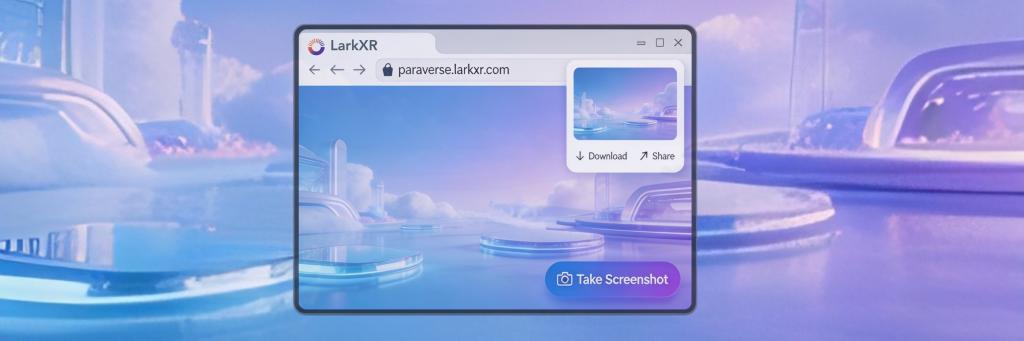
The client asked whether LarkXR provided built-in cloud storage capabilities or an alternative path for bidirectional file operations. Their question highlighted a common challenge: bridging the gap between cloud-rendered content and user-generated media workflows.

Our Solution: LarkXR Data Channel Architecture

We addressed this challenge into manageable frontend-driven workflows using LarkXR’s Data Channel plugin for upload/download operations and data transmission. This approach requires no deep changes to the Unreal application itself and fully leverages the web layer where users already interact.
 

Key Technical Advantages

  • Decoupled Architecture: Decouples file handling from the rendering engine, enabling specialized optimization for each component.
  • Universal Storage Compatibility: Works with any external storage provider—AWS S3, Google Cloud Storage, self-hosted solutions.
  • Performance Optimization: Maintains low latency and high security
  • Development Velocity: Enables rapid iteration using standard web development practices

1. Screenshot / Video Capture and Download

WebSDK exposes a simple yet powerful captureFrame method that triggers high-quality image capture directly on the cloud render node.
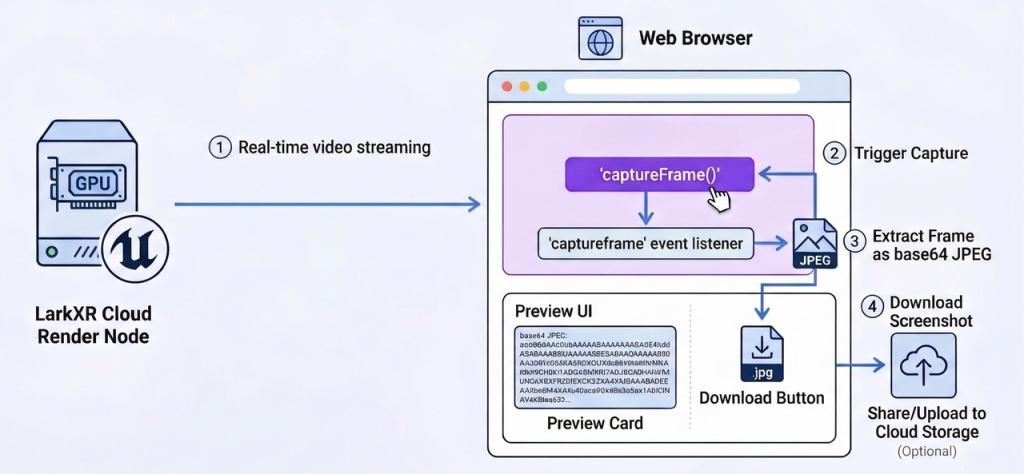

 
Triggering a screenshot from the frontend:
 
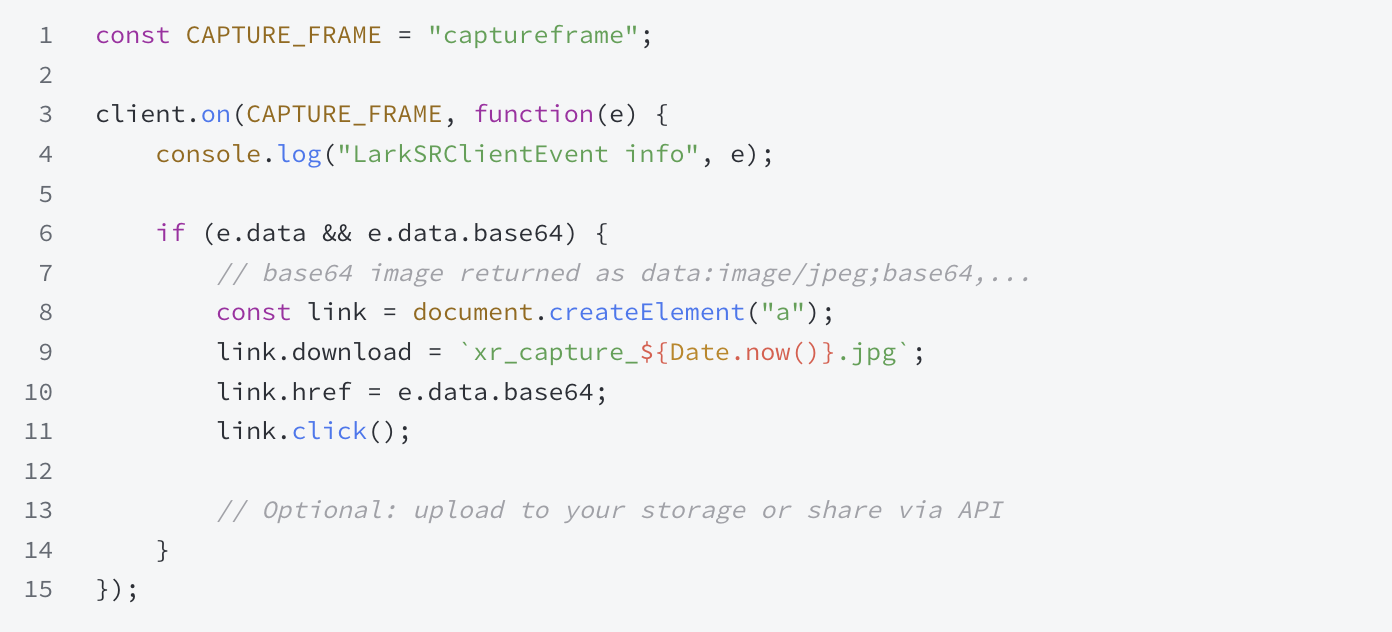
Listening to the successful capture event:
The event returns a clean base64-encoded JPEG that can be instantly downloaded, displayed in galleries, or forwarded to backend storage systems. The same pattern extends to video recording workflows through additional WebSDK methods
 
2. Media Upload from User Device (Client → Server)
Uploads follow a clean three-step web-native flow:

1. User selects file via standard HTML <input type=”file”> or drag-and-drop in your custom web frontend.
2. Upload the file directly to your preferred cloud storage (e.g., AWS S3) and obtain a secure URL.
3.Pass the URL (or binary data) to the Unreal Engine application via the Data Channel.
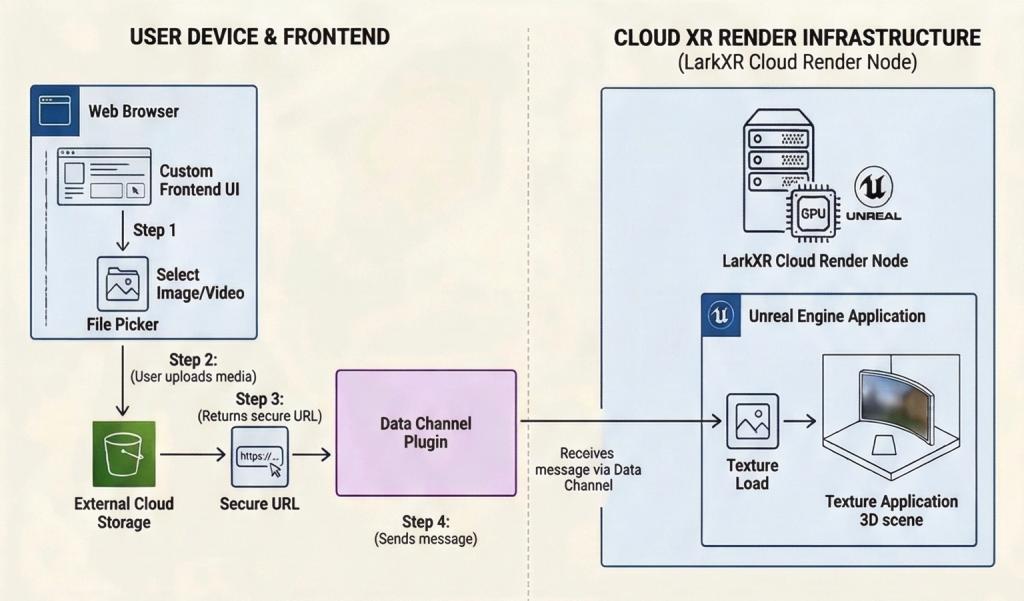
 
The Data Channel provides reliable bidirectional messaging between browsers and cloud-rendered Unreal applications. Once URLs reaches the application, you can load textures, display reference images, or process media dynamically — all without touching the EC2 instance’s file system.
 
 
Why This Approach Delivers Superior Results
Technical Benefits of This Cloud XR File Operations Approach
 
  • Minimal 3D Engines Modifications — Most logic lives in the web layer,accelerating development cycles and nd reducing complexity in Unreal Engine codebase
  • Scalable & Cost-effective Structure— Use the storage provider you already trust; LarkXR focuses purely on rendering and streaming.
  • High Performance — Screenshot capture runs on GPU-accelerated cloud nodes.
  • Broad Compatibility — Works across desktop browsers, mobile web, and XR headsets supported by LarkXR.
  • Future-Ready Architecture— Easily extend to video upload/download, real-time collaboration, or user-generated content galleries.

This pattern has proven highly effective for clients building training platforms, digital twin applications, and interactive marketing experiences across diverse industries.

Conclusion: Transforming Cloud XR User Experiences

The real power of cloud XR technology extends far beyond streaming visuals—it lies in enabling rich, interactive user experiences that seamlessly bridge virtual and real-world content. By identifying the root issue — the separation between runtime rendering and file operations and applying the right tools from our Paraverse LarkXR ecosystem, we transformed a perceived limitation into a streamlined and scaleble workflow.
 

File upload, download, screenshot capture, and content sharing are common requirements in modern XR applications. LarkXR’s Data Channel provide deep, flexible support that empowers developers to deliver exactly what end users expect — without compromising performance,security. And scalability. Our commitment to comprehensive secondary development tools ensures you can extend LarkXR far beyond basic streaming capabilities. Whether you are enhancing an existing deployment or building the next generation of cloud XR experiences.

Ready to implement seamless users content interaction to your cloud XR project? Review the Data Channel integration guide, or reach out — we’ll help you implement it quickly and efficiently.

Start Streaming Your 3D / XR Applications Today

Start My Free Trial
Go to Top